Chat with us, powered by LiveChat

Author: Ward Dutton

USB cable assemblies with USB-A and USB-B connectors

USB Cable Assemblies: A Guide to Connectors, Standards, and Construction

A USB cable assembly is a finished cable built to a USB specification, with a connector on each end, that carries data, power, or both between devices. USB cable assemblies are in nearly every product category, from consumer electronics to medical devices, industrial controls, and test equipment. Choosing the right one means matching the connectors, the USB data rate, the length, the current rating, and the cable’s construction to where it will be used.

This guide covers how USB cable assemblies are built, the USB standards and connector types in use today, length and power limits, and what to specify when you order a custom assembly. Technical Cable Applications (TCA) manufactures custom and OEM USB cable assemblies, from Type-A to USB-C.

What Is a USB Cable Assembly?

“USB cable” and “USB cable assembly” often mean the same thing. In manufacturing, “assembly” stresses that the product is built from separate parts: bulk cable, connectors, and the molding or hardware that joins them. It’s terminated and tested as a finished unit.

An off-the-shelf USB cable is a fixed design: standard connectors, a few stock lengths, a general-purpose jacket. A custom USB cable assembly is built to a drawing. The buyer specifies the connector ends and orientation, exact length, wire gauge, shielding, jacket material, overmold shape, labeling, and testing. OEMs use custom assemblies when a stock cable is the wrong length, won’t fit the enclosure, can’t survive the environment, or needs a connector combination nobody stocks.

Components of a USB Cable Assembly

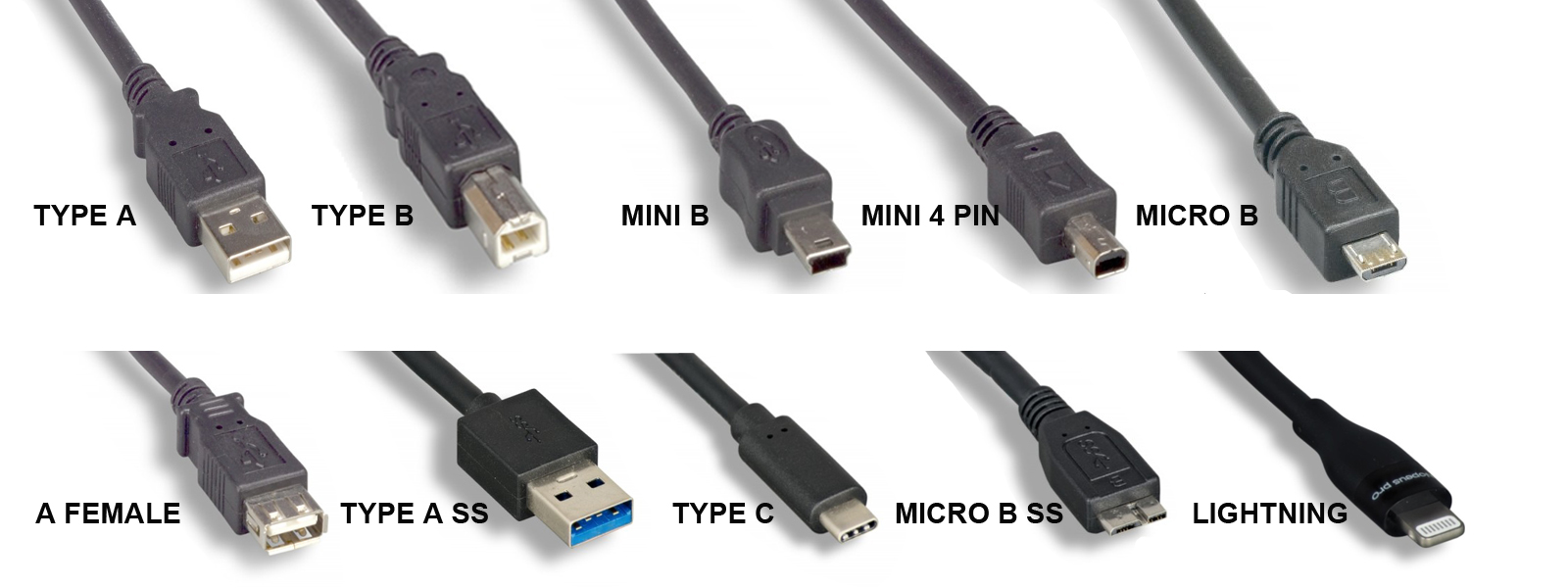
Each end has a plug (male) or receptacle (female) in one of the USB connector families: Standard-A, Standard-B, Mini-B, Micro-B, or USB Type-C. The connector determines which ports the cable fits and limits which USB data rates it can support. USB-C is the only connector that supports USB 3.2 Gen 2×2 (20 Gbps) and USB4.

Conductors

The wires inside depend on the USB version the cable supports:

  • USB 2.0: four conductors: VBUS (+5 V power), ground, and a twisted data pair (D+ and D−). The data pair is designed for 90 Ω differential impedance. Data wires are typically 28 AWG. Power wires range from 28 AWG to 20 AWG, and a heavier gauge allows a longer cable or more current.
  • USB 3.x on Standard-A, Standard-B, or Micro-B: the four USB 2.0 conductors plus two shielded SuperSpeed differential pairs (one transmit, one receive) and a drain wire.
  • USB-C to USB-C: a full-featured cable adds four high-speed differential pairs plus the configuration channel (CC), sideband use (SBU) lines, and VCONN, which powers the electronic marker chip described below. A USB 2.0-only USB-C cable leaves out the high-speed pairs.

Shielding

High-speed USB cables are shielded to contain electromagnetic interference (EMI) and protect the signal from outside noise. A common construction is an aluminum-foil shield under a tinned-copper braid, with a drain wire bonded to the connector shell. SuperSpeed pairs are usually shielded individually as well. Shielding matters more in electrically noisy places such as factories, near motors and drives, or around medical and RF equipment.

Jacket

The outer jacket protects the conductors from abrasion, chemicals, temperature, and flexing. PVC is the general-purpose standard. PUR (polyurethane) and TPE resist oil, abrasion, and repeated flexing better, which suits machinery and cable carriers. Low-smoke zero-halogen (LSZH) jackets are specified where smoke toxicity is a concern.

Overmold, Backshell, and Strain Relief

The joint between cable and connector is the most common failure point. Overmolding encases the termination in molded plastic to seal it and give it a shaped strain relief. Metal or die-cast backshells add mechanical strength and EMI protection, and some include thumbscrews or latches to lock the plug in place.

Electronic Marker (USB-C)

Many USB-C cables include an electronic marker (e-marker) chip that reports the cable’s capabilities, such as current rating and supported data rate, to connected devices. The USB Type-C specification requires an e-marker in cables rated for 5 A and in full-featured USB-C to USB-C cables. Without one, a device assumes the cable is limited to 3 A.

USB Standards and Data Rates

USB was introduced in 1996, and each major revision raised the maximum data rate. The USB Implementers Forum (USB-IF) has renamed several versions over time. For example, the original USB 3.0 has also been called USB 3.1 Gen 1 and USB 3.2 Gen 1. Since 2022, USB-IF has recommended that products be labeled by speed (“USB 5Gbps,” “USB 10Gbps,” and so on) rather than by version number.

Version (later names) Max data rate Speed-based label Connectors Year
USB 1.0 / 1.1 1.5 Mbps (Low Speed), 12 Mbps (Full Speed) n/a Standard-A, Standard-B 1996 / 1998
USB 2.0 480 Mbps (High Speed) n/a Standard-A/B, Mini, Micro, USB-C 2000
USB 3.0 (USB 3.1 Gen 1, USB 3.2 Gen 1) 5 Gbps USB 5Gbps Standard-A/B SuperSpeed, Micro-B SuperSpeed, USB-C 2008
USB 3.1 Gen 2 (USB 3.2 Gen 2) 10 Gbps USB 10Gbps Standard-A SuperSpeed, USB-C 2013
USB 3.2 Gen 2×2 20 Gbps USB 20Gbps USB-C only 2017
USB4 (Version 1.0) 20 or 40 Gbps USB 20Gbps / USB 40Gbps USB-C only 2019
USB4 Version 2.0 80 Gbps; up to 120 Gbps one way in asymmetric mode USB 80Gbps USB-C only 2022

USB 2.0 remains the most common interface for peripherals, sensors, and embedded devices that don’t need high bandwidth, because it’s inexpensive and tolerates longer cable runs. The 5 Gbps to 20 Gbps tiers cover storage, cameras, and docking. USB4 serves high-bandwidth uses such as external displays and fast storage.

USB Connector Types

The connector and the data rate are separate choices. A USB-C cable can be wired for USB 2.0 only or for USB4, so specify both. For help telling connectors apart by sight, see our guide on how to identify USB cable types.

Connector Versions Typical use today Introduced
Standard-A USB 1.x, 2.0; SuperSpeed version (9-pin) for USB 3.x Host side of most legacy cables: computers, chargers, hubs 1996
Standard-B USB 1.x, 2.0; SuperSpeed version for USB 3.x Printers, scanners, audio interfaces, instruments, industrial equipment 1996
Mini-B USB 2.0 Older cameras, GPS units, MP3 players; still found on some industrial and test equipment ~2000
Mini-A / Mini-AB USB 2.0 (On-The-Go) Rarely used; deprecated by USB-IF in 2007 ~2001
Micro-B USB 2.0; SuperSpeed version (10-pin, wider) for USB 3.x Older Android phones and accessories; Micro-B SuperSpeed on many external hard drives 2007
Micro-A / Micro-AB USB 2.0 (On-The-Go) Let a mobile device act as host; uncommon 2007
USB Type-C USB 2.0 through USB4; USB Power Delivery Current standard for phones, laptops, tablets, and new devices; reversible 2014

Apple’s Lightning connector (2012) isn’t a USB-IF connector, though USB-to-Lightning cables are common. Apple has moved its newer devices to USB-C, and since 28 December 2024 the EU has required USB-C charging ports on phones and many other portable devices sold there.

USB Cable Length Limits

Signal loss rises with frequency, so the faster the data rate, the shorter a passive cable can be. These are the usual limits for passive cables:

Cable type Typical maximum length
USB 2.0 (Standard, Mini, Micro connectors) 5 m
USB 3.x, Standard-A/B or Micro-B, 5 Gbps About 3 m in practice (the spec sets a loss budget, not a length)
USB-C to USB-C, USB 2.0 4 m
USB-C to USB-C, 5 Gbps 2 m
USB-C to USB-C, 10 Gbps 1 m
USB-C to USB-C, USB4 40 Gbps 0.8 m

USB-C lengths are the recommended maximums in the USB Type-C specification. Longer runs need active cables, which use electronics in the connector housing to regenerate the signal, or active optical cables (AOCs), which carry data over fiber. Powered hubs and repeaters are another option.

Power and Current Ratings

USB cable assemblies carry power as well as data, so the conductors have to be sized for the current.

  • Default USB power: 500 mA at 5 V for USB 2.0 ports and 900 mA for USB 3.x ports.
  • Battery Charging (BC 1.2): up to 1.5 A at 5 V from dedicated charging ports.
  • USB Type-C current: 1.5 A or 3 A at 5 V, advertised over the CC line.
  • USB Power Delivery (PD): negotiates higher voltages. Standard Power Range reaches 100 W (20 V at 5 A). Extended Power Range, added in PD 3.1 (2021), reaches 240 W (48 V at 5 A).

Every USB-C cable must handle at least 3 A. Delivering more than 60 W (above 3 A) takes a 5 A-rated cable with an e-marker. In a custom assembly, the power-conductor gauge, the cable length, and the allowable voltage drop are designed together.

Common USB Cable Assembly Configurations

  • Straight-through cables: a standard connector on each end, such as USB-A to USB-C or USB-A to Micro-B.
  • Right-angle and up/down-angle connectors: for tight enclosures and cable routing.
  • Panel-mount and bulkhead extensions: bring a USB port through an enclosure wall to a front panel.
  • Locking and screw-retention connectors: thumbscrews, latches, or threaded couplings keep the plug seated under vibration.
  • Sealed connectors: IP-rated USB connectors and sealed overmolds for washdown, outdoor, or dusty environments.
  • Y-cables and split cables: separate power and data, or feed power from two ports.
  • Adapter cables: USB to serial (RS-232/RS-485), USB to Ethernet, USB to HDMI, and other protocol converters.
  • Bare or pigtail ends: a USB connector on one end and stripped, tinned, or crimped leads on the other for wiring to a board or terminal block.

For machinery, automation, and other harsh environments, see our overview of industrial USB cables.

How to Specify a Custom USB Cable Assembly

A complete specification avoids rework and gets an accurate quote faster. Define the following:

  1. Connector ends: connector type, gender, and orientation (straight, right-angle) for each end.
  2. USB version and data rate: USB 2.0, 5/10/20 Gbps, or USB4. This sets the conductor count and shielding.
  3. Length and tolerance: keep within the limits above, or plan for an active solution.
  4. Current and voltage: the maximum current and whether USB Power Delivery or an e-marker is needed.
  5. Wire gauge: especially for the power conductors on longer cables.
  6. Shielding: foil, braid, or both, and how the shield terminates to the connector shell.
  7. Jacket: material (PVC, PUR, TPE, LSZH), color, outer diameter, and flex requirements.
  8. Environment: temperature range, chemical or oil exposure, UV, moisture or ingress rating, and vibration.
  9. Termination and strain relief: overmold shape, backshell, locking hardware.
  10. Compliance: for example RoHS, REACH, UL listing, or USB-IF certification if the product will carry USB logos.
  11. Labeling and packaging: part-number labels, heat-shrink markers, bagging, and coiling.
  12. Testing: the electrical tests required and any documentation that must ship with each lot.
  13. Quantity: prototype, pilot, and production volumes.

A drawing with the full pinout is the fastest route to a quote. Learn more about TCA’s custom USB cable assemblies.

Testing and Quality

USB cable assemblies are usually tested for continuity, opens, and shorts on every conductor. Many specifications add insulation resistance or hipot testing. High-speed assemblies may also need signal-integrity testing, such as differential impedance, insertion loss, and crosstalk, to confirm the cable meets its data rate at its length. Products that will display USB-IF logos must pass USB-IF compliance testing.

TCA is ISO 9001:2015 certified for custom and OEM cable assembly, and holds UL cable assembly certification for the United States and Canada.

Custom Requirements

In addition to our OEM offerings, Technical Cable Applications’ skilled specialists are ready to help with any custom cable assembly requirements you might have. TCA stocks cables, connectors, and materials by the thousands and can custom build dies and molds not on hand.

Please contact the TCA Technical Sales Team for assistance with all your cable assembly needs by reaching out to [email protected] or giving us a call!

*Please provide cable drawings and all documentation available when contacting us so we can quickly give you an accurate quote. We will do our best to research specifications and materials if a drawing is not available, but if no documentation exists that may need to be created first before we can proceed.
Custom Cable Assembly

The First Article Process

The First Article Process is a crucial part of production requirements at Technical Cable Applications.  The process confirms that an assembly has been designed as intended and that documentation is complete and interpreted correctly.  It verifies that proper assembly techniques and tooling are used and assures that later builds of product are produced without variation.

Quotation

At TCA the first article process starts before an order is ever placed.  During the quote process the customer drawings or specifications are carefully reviewed.   This assures that all the elements for successful production are included.

The bill of materials is evaluated to make certain all the components shown on the drawing are called out and in the correct quantities.   They are looking for any obvious material conflicts such as wire size /terminal compatibility.  A mismatch like this could be because the insulation diameter or wire AWG is too large or too small for a terminal. Discrepancies like this could affect the integrity of the product or damage tooling.

The drawing is checked for clear dimensional criteria and for tolerances that are achievable for cable assemblies.   It is also reviewed for references to any documents or quality standards other than IPC.  If other quality documents are referenced Technical Cable Applications quotations specialists assure those documents are on file.

Tooling and Test Fixtures

During the quote process tooling requirements are checked for all the components.  At Technical Cable Applications the component manufacturers recommendations are checked to assure that the right tools are on hand.   It is verified that mating test fixtures are available for all connectors.  If either of the tooling or test fixtures are not on hand, they will need to be ordered for the build.

Work instructions

Work instructions are created by Technical Cable Applications production engineers.  These seasoned professionals have broad knowledge and training in cable assembly production and quality standards. For cable assemblies this would be to the IPC/WHMA -620B standard.  If there are other production or quality standards called out in the customer documentation the production engineers will obtain a copy and make sure they are part of the process.

The work instruction lists all the machines, tools, fixtures, and materials used.  It contains set up and programming instructions for any equipment used.

A Detailed Accounting

As the production engineers build the first article, they keep a detailed step by step accounting for every process used to build the assembly and in the order it is to be completed.    Special instructions and cautionary notes are often part of the instructions with detailed pictures for each step included.  The completed work instructions are controlled on a central server and every workstation has a computer terminal with to access the information.

In the event the production engineer finds any issue, conflict or has any concerns during the first article build the Sales Specialist is notified, the customer is contacted, and the concern and any resolution are documented.

Test and Inspection

Test and inspection steps are included in the work instruction including inspections where a process might be hidden by a subsequent step.

The finished first articles are sent to the Technical Cable Applications quality department where the assembly undergoes a series of dimensional and quality checks to assure that the assembly meets or exceeds the customer specifications.  The first article assemblies are tested and sent to packaging to be shipped with first article documentation to the customer.

Validation

Once the first article is inspected, tested, and approved by the customer the work instructions are validated by Technical Cable Applications quality personnel.  Production can then be scheduled for the assemblies.

Contact

Technical Cable Applications is an ISO9001:20015 registered company.  Please contact the Technical Cable Applications sales team for help with all of you cable assembly needs.

Off-The-Shelf Cable Assemblies

Off-The-Shelf (OTS) cable assemblies are already made cable assemblies and wiring harnesses for a variety of standard applications.  There are tremendous advantages to purchasing off the shelf product.  Most notably are lower cost and immediate delivery.  Technical Cable Applications is best known for the custom cable assemblies and wiring harnesses produced in our Auburn, Washington facility.   TCA also offers a huge variety of Off-The Shelf cable assemblies that are in stock in warehouses throughout the country.

Read More

power cables

UL Certified Cable Manufacturer

Technical Cable Applications is a UL certified cable assembler.

The UL mark signifies that a product meets a stringent set of standards for both safety and quality. UL has developed guidelines and procedures to evaluate and certify millions of electronic and electrical components. UL certified components must be tested to meet certain requirements to mitigate risk factors such as fire and electrical shock.

Read More

Custom Cable Manufacturers Auburn, WA

Cable Assemblies for Cryptocurrency Mining

Cryptocurrency mining operations use various types of equipment to produce depending on the type of currency desired.  The many types of currencies like Bitcoin, Ethereum, Cash, Litecoin and HNT (Helium) require GPU, ASIC’s or HNT hardware devices. The most profitable undertakings are often located in high-speed data centers. Operations large and small all have one thing in common.  The need for cable assemblies to function.

Read More

Cable Assembly

Onshore Versus Offshore Manufacturing

There are a number of reasons you may have your assemblies built onshore.  You may also be thinking about bringing product back onshore in today’s market, but there can still be good reason to consider offshoring your assemblies. Here we will explore onshore versus offshore manufacturing of cable assembles. Technical Cable Applications can support both your onshore and offshore production requirements.

Read More

Cable Assembly